The Hidden Token Drain: How Intermediate Results Bloat Your AI Agent's Context

Building on our previous exploration of MCP's context consumption challenges, this post examines a less obvious but equally expensive problem: intermediate results in multi-step tool workflows.
Quick Recap: What Is MCP?
The Model Context Protocol (MCP) is an open standard that lets AI agents connect to external tools: databases, APIs and file systems through a unified interface. Instead of building custom integrations for each tool, developers implement MCP once and unlock an entire ecosystem.
But as we covered in our first post, MCP tool definitions consume context. If you do not carefully manage the context window, you can easily consume the majority of your context on tool definitions, leaving little attention for the user's prompt.
Today's problem is different: what happens when those tools actually run?
How Tool Calls Actually Work
Before diving into the problem, let's understand the mechanics. Cloudflare's engineering team provides a clear explanation in their Code Mode post.
When an LLM wants to invoke a tool, it outputs special tokens that signal "this is a tool request." These tokens don't have textual equivalents: the LLM is trained to produce them when it wants to call a tool. The agent harness intercepts these tokens, executes the tool, and feeds the result back into the LLM's context window using another special token sequence.
User: "What's the weather in Austin?"

LLM output:
  I will use the Weather MCP server to find out the weather.
  <tool_call>{"name": "get_current_weather", "args": {"location": "Austin, TX"}}</tool_call>

[Agent executes tool, returns result]

<tool_result>{"location": "Austin, TX", "temperature": 93, "conditions": "sunny"}</tool_result>

LLM continues:
  It's 93°F and sunny in Austin.
This works well for single tool calls. The problem emerges when tools need to chain.
The Intermediate Results Problem
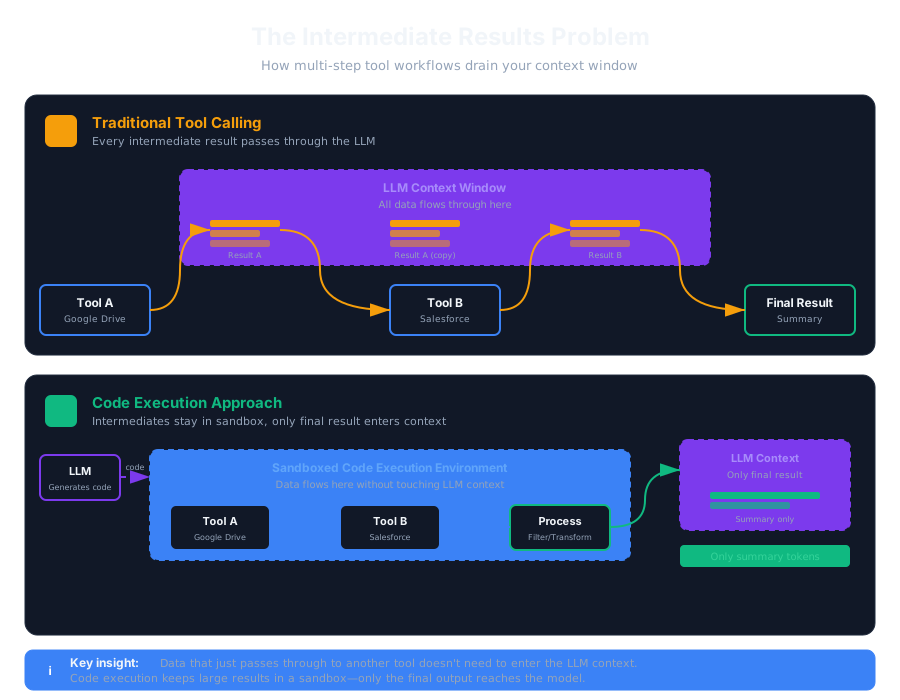
Consider this scenario from Anthropic's Code Execution with MCP post: "Download my meeting transcript from Google Drive and attach it to the Salesforce lead."
Your agent needs to:
- Fetch the document from Google Drive
- Pass its contents to the Salesforce API
Here's what happens:
TOOL CALL: b.getDocument(documentId: "abc123")
→ Returns full transcript content
  (This entire output enters the LLM's context window)

TOOL CALL: salesforce.updateRecord(
    objectType: "Lead",
    recordId: "00Q5f...",
    data: { "Notes": [full transcript content written out again] }
)
The transcript flows through the LLM's context window twice. The model reads the entire document just to copy it to the next tool call. For lengthy documents like a 2-hour meeting transcript, this can mean processing tens of thousands of additional tokens. For even larger documents, this may exceed context limits entirely, breaking the workflow.
The Pattern Scales Poorly
Real-world agent workflows often involve more than two steps. Each step forces the entire intermediate result through the model's context window, even when the LLM only needs a summary or a subset. You're paying for tokens that serve no reasoning purpose: they're just being copied from point A to point B.
Additionally, models are more likely to make mistakes when copying large documents or complex data structures between tool calls.
Why Not Write a Combined Tool?
You might think: "Just create a tool that handles both steps internally."
This approach doesn't scale well. With many tools that might chain together in various combinations, you'd need many combination tools. Your MCP server becomes harder to maintain, and the tool definitions themselves consume the context you're trying to save.
Solutions: Keeping Intermediates Out of Context
Both Anthropic and Cloudflare have converged on the same insight: let the LLM write code instead of making tool calls directly.
Code Execution as Orchestration
Instead of the LLM invoking tools one-by-one through special tokens, it writes a script that orchestrates the entire workflow. The script runs in a sandboxed environment, calling tools via API bindings. Only the final result enters the LLM's context.
# LLM generates this code:
transcript = await gdrive.get_document("abc123")
await salesforce.update_record(
    object_type="Lead",
    record_id="00Q5f...",
    data={"Notes": transcript}
)
print("Lead updated successfully")
The transcript never touches the LLM's context window. It flows from Google Drive to Salesforce entirely within the execution environment. The model only sees the final output.
This approach leverages a key strength: LLMs have seen enormous amounts of real-world code in their training data. Tool calling, by contrast, relies on synthetic training data created specifically to teach the model a format it has rarely encountered.
Programmatic Tool Calling
Anthropic's Programmatic Tool Calling formalizes this pattern. Tools are marked with allowed_callers: ["code_execution"], enabling them to be invoked from within a sandboxed Python environment.
When the code calls a tool, the result is processed by the script and not the model:
- Average token usage dropped from 43,588 to 27,297 tokens (37% reduction) on complex research tasks
- Internal knowledge retrieval accuracy improved from 25.6% to 28.5%
- GIA benchmark scores improved from 46.5% to 51.2%
Illustrative Example: Budget Compliance Check
Let's look at a concrete example: "Which team members exceeded their Q3 travel budget?"
Traditional approach:
Fetch team members                              →  Tool result enters context
For each member, fetch Q3 expenses              →  All expense line items enter context
Fetch budget limits                             →  More context consumption
LLM manually sums and compares each person      →  Error-prone, slow
With code execution:
team = await get_team_members("engineering")
expenses = await asyncio.gather(*[
    get_expenses(m["id"], "Q3") for m in team
])
budgets = {level: await get_budget(level) for level in set(m["level"] for m in team)}

exceeded = [
    {"name": m["name"], "spent": sum(e["amount"] for e in exp), "limit": budgets[m["level"]]}
    for m, exp in zip(team, expenses)
    if sum(e["amount"] for e in exp) > budgets[m["level"]]["travel_limit"]
]
print(json.dumps(exceeded))
The LLM sees only the filtered final result: not every expense line item processed along the way.
Token Caching: A Complementary Strategy
Token caching helps when the same tool definitions or prompts appear across multiple requests.
However, caching doesn't solve the intermediate results problem: it addresses repeated static content, not the dynamic data flowing between tools. Use both strategies together.
File-Based Intermediate Storage
For workflows where the LLM needs to inspect intermediate results selectively, consider writing them to files:
# Write large result to file
with open("/workspace/data.json", "w") as f:
    json.dump(large_result, f)
# LLM can now use file tools to read specific portions# Only what's actually needed enters context
This pattern works especially well when combined with tools like jq for JSON processing or standard text utilities for filtering: letting the agent extract exactly what it needs.
Implementation Considerations
Sandboxing
Running LLM-generated code requires secure isolation. Cloudflare's approach uses V8 isolates, which they describe as "far more lightweight than containers": an isolate can start in a handful of milliseconds using only a few megabytes of memory. Other options include containers or serverless functions.
Privacy Benefits
Code execution can enhance privacy. Intermediate results stay in the sandbox by default: sensitive data never enters the model's context unless explicitly logged. The MCP client can even tokenize PII before it reaches the model, detokenizing only when writing to approved destinations. Production deployments should include additional hardening: resource limits, network isolation, and regular security audits of the execution environment.
When To Use Each Approach
Traditional tool calling works well for:
- Simple single-tool invocations
- Tasks where the LLM needs to reason about intermediate results
- Quick lookups with small responses
Code execution is beneficial when:
- Processing large datasets where you need aggregates or summaries
- Running multi-step workflows with dependent tool calls
- Filtering or transforming results before the LLM sees them
- Parallelizing operations across many items
Conclusion
The intermediate results problem becomes visible when agents move beyond simple single-tool queries to complex, multi-step workflows.
The key insight from both Anthropic and Cloudflare: LLMs don't need to see data they're not reasoning about. When a tool result is just passing through to another tool, keep it in an execution environment where code can handle the transfer.
As agents take on more complex workflows, managing context efficiently becomes critical. The combination of on-demand tool discovery and code-based orchestration provides building blocks for agents that can scale.
Further Reading
- Code Mode: The Better Way to Use MCP: Cloudflare's deep dive on code execution vs. direct tool calling
- Code Execution with MCP: Anthropic's engineering blog on efficient agent patterns
- Advanced Tool Use on Claude: Programmatic Tool Calling, Tool Search, and Tool Use Examples

The latest from our team
Explore stories on DevOps, AI, and enterprise security

Ready to transform your operations
See how Hyground reduces incident response time and strengthens your security posture