AI
SRE
Using an AI SRE agent beyond incidents: automated regression tests
An AI SRE agent connected to your whole environment can take on recurring work you design, far beyond diagnosing incidents. This is one workflow we run internally: a regression smoke test in which our agent tests its own toolbox every six hours, and how it became a scheduled skill.

When most people think of AI SRE agents, they think of diagnosing incidents faster. But an agent that understands and is connected to your whole environment opens up way more opportunities: you can give it recurring work built around your own systems.
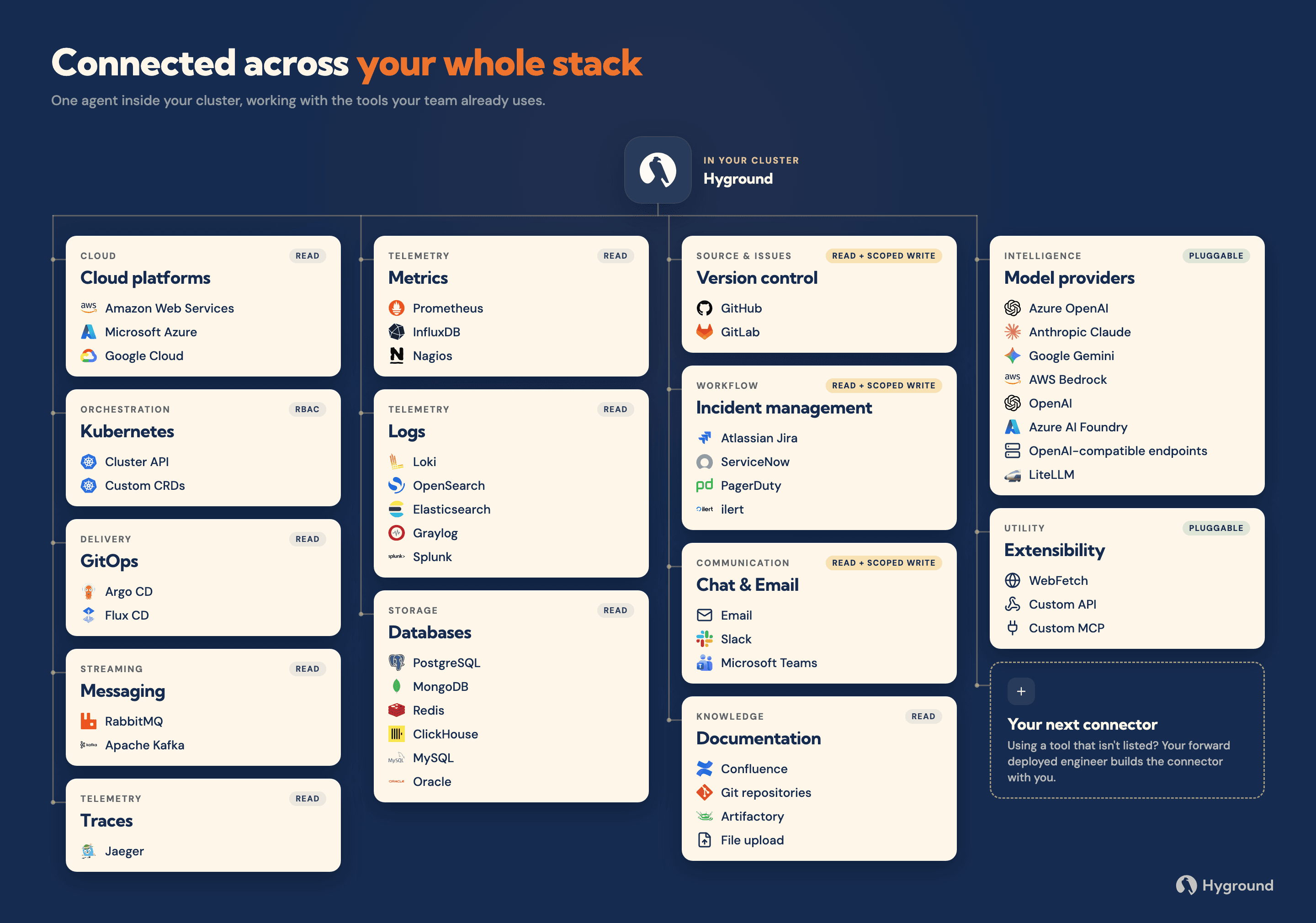
Hyground runs inside your infrastructure, connected to your logs, metrics, GitHub, Jira, chat and a shell.
On the Hyground instance we run internally, the schedule holds a mix of recurring reports, scans and summaries. One entry, every six hours, is a regression smoke test in which the agent tests its own toolbox.
We run it because a failed tool call forces the agent to work around the breakage, and every retry costs attention that should otherwise be spent on solving your actual problem.
You can copy the pattern for your own company or use it as a starting point for building your own skills and workflows. Every environment is different, so there is no one-size-fits-all version; take this as inspiration for your own automations.
A six-minute walkthrough of the whole loop, from the scheduled smoke test to the fixes filed as GitHub issues.
A correct answer can still fail
The loop is built to catch dull tools before it catches broken features. A run counts as failed even when its final answer is right, because friction that leaves one run correct can push the next run toward a wrong answer.
Every run records its results table in the session. A recent one looked like this:
Category | Prompt | Verdict | Tool calls |
|---|---|---|---|
Investigation | Checkout service slow | FAIL | 15 calls; 2 failed; 5 recovery attempts |
Repo | Terraform topology diagram | PASS | 6 calls; 1 syntax error, recovered once |
Investigation | Gatekeeper pod restarting frequently | PASS | 6 calls; none failed |
The “Checkout service slow” investigation got the right answer; the service was healthy, with no restarts, low CPU, memory within its limit and no warning events. Getting there took 15 tool calls though, 2 of which failed, plus 5 recovery attempts, so the test failed.

How the loop is put together
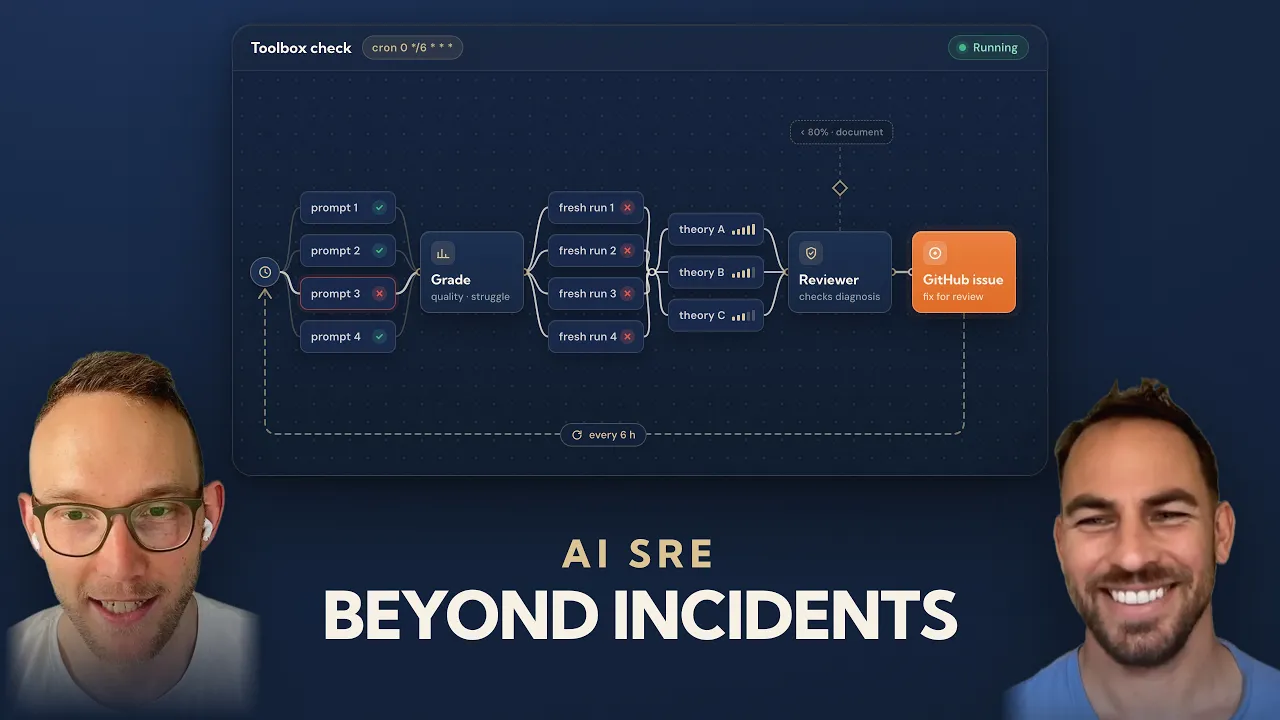
We keep a catalog of regression prompts written in plain language, phrased the way a user would ask: investigations, knowledge-base lookups and questions about code repositories. A prompt is only picked if the environment it runs against has what it needs, Kubernetes and Prometheus for example.
Each run picks four prompts at random, and each goes to its own independent agent, all four in parallel with no shared context.
The orchestrating agent grades each answer and the path to it, checking the agents’ reports against the raw tool results. A test fails when:
a tool or access error prevents a grounded conclusion
the answer is unsupported or made up
the investigation shows abnormal repeated failures and retries
A passing run sends no message. When a test fails, one short message goes to the developer channel in Microsoft Teams.
Confirming a failure before any fix is filed
Before anything is filed, the loop tries to reproduce the failure. The failed prompt is rerun word for word by four fresh agents, with no hint of what went wrong. At least two of the four must show the same kind of failure, otherwise it is logged as a transient blip.
For a confirmed failure, the agent looks for the cause in the CLI and its help text, the skill instructions, the agent guidance and our own application code, and proposes a proportionate fix for each finding. If better documentation is the best fix, it proposes documentation before code changes.
Then a separate reviewer agent challenges the diagnosis and rates each fix from 0 to 100% on one question: will this improve the situation? Only fixes rated 80% or more become GitHub issues after a check for duplicates, the rest are then documented in the run report. Filed issues carry labels so a separate coding-agent loop on our side picks them up.
The reruns and the reviewer exist because a model grading its own work is the old test-oracle problem. For example: in one rerun, an agent rated its own run “no struggle” while its log showed 15 calls and 2 failures.

How we went from a session to a reusable skill
The skill started as a chat session. We asked Hyground to rerun a failed prompt with four fresh agents, find the causes in the prompt and our code, suggest fixes with a confidence percentage, and file GitHub issues for the good ones. The reruns reproduced the struggle, and the analysis converged on three causes:
Cause | Fix | Confidence |
|---|---|---|
Help text pointed agents to | Standardize the file name | 90% |
Agents typed | Accept | 95% |
The test prompt was too vague: no cluster, namespace or time window | Give the test hidden context about its target | 80% |
The first two are places where our documentation and code weren’t in sync. The agent is a very literal user of its tooling, so it finds every such gap, because it has no instinct to work around one the way a human might.
The third was a problem in the test itself, found by the system under test. The alias fix was merged the same morning and the file-name fix the next day.
We then asked Hyground to write the skill from that session and put it on a schedule, and it drew the flow of the automated version as a diagram for us to check its logic.
The loop now runs unattended every six hours and keeps finding things that slow us down: friction in our tools, problems in the tests, and faults in the environment it runs in.
Building your own
Our setup will not transfer one-to-one to yours, because every environment is different, but the approach is repeatable for anyone with an agent connected to their environment.
Pick a task the agent can already do in a session, turn the session into a skill, and put the skill on a schedule. When you analyse the results, grade how the agent got there as well as the answer it gave, check every report against the raw tool records, and rerun a failure before you believe it.
The same pattern also fits work that has nothing to do with the agent’s own tools. Testers who use Hyground to gather test data could write their regression checks in plain language, run them on a schedule, and have Hyground check whether a failing test already has a Jira ticket and suggest a fix in GitHub at the same time.

See Hyground in action

Author
Florian Hansen
Founding Engineer
Florian is Founding Engineer at Hyground, building a sovereign AI SRE agent that goes beyond incident resolution. The conviction is earned: years of dozens of cloud projects at MaibornWolff across different teams, stacks and cultures, then a long stretch carrying the pager for a business-critical system 24/7; a fast way to learn how production actually fails. Writing about agent tooling and agent UX, AI SRE, and the distance between a demo and 3am. Off the clock: epic fantasy, good coffee, and nature.